#include "ros/ros.h"
#include "sensor_msgs/Imu.h"
#include <wiringPiI2C.h>
#include <wiringPi.h>
#include <unistd.h>
#include <math.h>
#include <stdio.h>
#include <sstream>

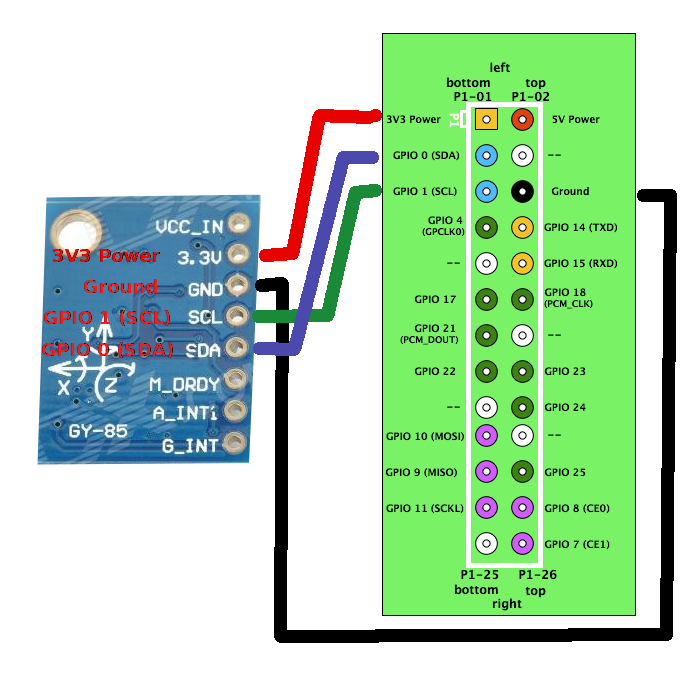
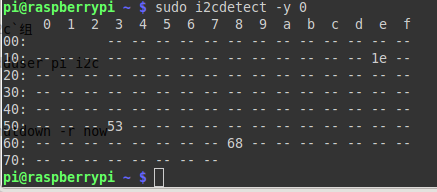
#define GYRO 0x68 //  when AD0 is connected to GND ,gyro address is 0x68.
//#define GYRO 0x69   when AD0 is connected to VCC ,gyro address is 0x69
#define G_SMPLRT_DIV 0x15
#define G_DLPF_FS 0x16
#define G_INT_CFG 0x17
#define G_PWR_MGM 0x3E
#define G_TO_READ 8 // 2 bytes for each axis x, y, z


#define ADXL345_REG_POWER_CTL 0x2D
#define ADXL345_REG_DATA_FORMAT 0x31
#define ADXL345_MG2G_MULTIPLIER 0.004
#define SENSORS_GRAVITY_EARTH 9.806

#define M_CFGR_A 0x00
#define M_CFGR_B 0x01
#define M_MODER 0x02
#define PI 3.14
#define declination_angle -0.5167
using namespace std;
int gyrofd;
int accfd;
int magfd;
float m_scale = 1.0;
int g_offx = 120;
int g_offy = 20;
int g_offz = 93;

void magnetoSetScale(float gauss);

void magnetoSetScale(float gauss)
{
   unsigned char value = 0;
    if(gauss == 0.88)
    {
      value = 0x00;
      m_scale = 0.73;
   }
   else if(gauss == 1.3)
   {
      value = 0x01;
      m_scale = 0.92;
   }
   else if(gauss == 1.9)
   {
      value = 0x02;
      m_scale = 1.22;
   }
   else if(gauss == 2.5)
   {
      value = 0x03;
      m_scale = 1.52;
   }
   else if(gauss == 4.0)
   {
      value = 0x04;
      m_scale = 2.27;
   }
   else if(gauss == 4.7)
   {
      value = 0x05;
      m_scale = 2.56;
   }
   else if(gauss == 5.6)
   {
      value = 0x06;
      m_scale = 3.03;
   }
   else if(gauss == 8.1)
   {
      value = 0x07;
      m_scale = 4.35;
   }

   value <<= 5;
   wiringPiI2CWriteReg8(magfd, M_CFGR_B, value);
}

bool initGyro(){
        gyrofd = wiringPiI2CSetup (0x68);
        if(gyrofd < 0)
                return 0;
        wiringPiI2CWriteReg8(gyrofd, G_PWR_MGM, 0x00);
        wiringPiI2CWriteReg8(gyrofd, G_SMPLRT_DIV, 0x07);
        wiringPiI2CWriteReg8(gyrofd, G_DLPF_FS, 0x19);
        //wiringPiI2CWriteReg8(gyrofd, G_INT_CFG, 0x00);
        return 1;

}
bool initMagnetometer(){
        magfd = wiringPiI2CSetup(0x1E);
        if(magfd < 0)
                return 0;
        magnetoSetScale(1.3);
        wiringPiI2CWriteReg8(magfd, M_MODER, 0x00);
        //wiringPiI2CWriteReg8(magfd, M_CFGR_A, 0x70);
        //wiringPiI2CWriteReg8(magfd, M_CFGR_B, 0xA0);

        return 1;


}
bool initAccelerometer(){
        accfd = wiringPiI2CSetup(0x53);
        if(accfd < 0)
                return 0;
        //3 ja 4 bitti 1, jotta -> measureenable ja autosleep 0b1100
        wiringPiI2CWriteReg8(accfd, ADXL345_REG_POWER_CTL, 0x0C);
        //0x00 paikalle voi vaihtaa rangea, nyt 2G
        wiringPiI2CWriteReg8(accfd, ADXL345_REG_DATA_FORMAT, ((wiringPiI2CReadReg8(accfd, ADXL345_REG_DATA_FORMAT) & ~0x0F) | 0x00) | 0x08);
        return 1;
}
void readMagneto(int r[3])
{
        //0 on x, 1 on y, 2 on z
        r[0] = ((wiringPiI2CReadReg8(magfd, 0x03) << 8)|  wiringPiI2CReadReg8(magfd, 0x04));
        r[2] = ((wiringPiI2CReadReg8(magfd, 0x05) << 8)|  wiringPiI2CReadReg8(magfd, 0x06));
        r[1] = ((wiringPiI2CReadReg8(magfd, 0x07) << 8)|  wiringPiI2CReadReg8(magfd, 0x08));
        if(r[0] & (1<<16-1))
                r[0] = r[0] - (1<<16);
        if(r[1] & (1<<16-1))
                r[1] = r[1] - (1<<16);
        if(r[2] & (1<<16-1))
                r[2] = r[2] - (1<<16);

}
void  readAccelerometer(double r[3])
{
        int re[3];
        //0 on x, 1 on y, 2 on z
        //r[0] = wiringPiI2CReadReg16(accfd, 0x32)* ADXL345_MG2G_MULTIPLIER * SENSORS_GRAVITY_EARTH;
        //r[1] = wiringPiI2CReadReg16(accfd, 0x34)* ADXL345_MG2G_MULTIPLIER * SENSORS_GRAVITY_EARTH;
        //r[2] = wiringPiI2CReadReg16(accfd, 0x36)* ADXL345_MG2G_MULTIPLIER * SENSORS_GRAVITY_EARTH;
        re[0] = wiringPiI2CReadReg8(accfd, 0x32) | (wiringPiI2CReadReg8(accfd, 0x33) << 8);
        if(re[0] & (1<<16-1))
                re[0] = re[0] - (1<<16);
        re[1] = wiringPiI2CReadReg8(accfd, 0x34) | (wiringPiI2CReadReg8(accfd, 0x35) << 8);
        if(re[1] & (1<<16-1))
                re[1] = re[1] - (1<<16);
        re[2] = wiringPiI2CReadReg8(accfd, 0x36) | (wiringPiI2CReadReg8(accfd, 0x37) << 8);
        if(re[2] & (1<<16-1))
                re[2] = r[2] - (1<<16);

        r[0] = re[0] * ADXL345_MG2G_MULTIPLIER;
        r[1] = re[1] * ADXL345_MG2G_MULTIPLIER;
        r[2] = re[2] * ADXL345_MG2G_MULTIPLIER;

        r[0] = r[0] * SENSORS_GRAVITY_EARTH;
        r[1] = r[1] * SENSORS_GRAVITY_EARTH;
        r[2] = r[2] * SENSORS_GRAVITY_EARTH;


}
void  readGyro(double r[4])
{

        int ri[4] = {0};

        //0 on x, 1 on y, 2 on z, 3 on l�mp�tila
        ri[0] = ((wiringPiI2CReadReg8(gyrofd, 0x1D) << 8) |  wiringPiI2CReadReg8(gyrofd, 0x1E));
        if(ri[0] & (1<<16-1))
                ri[0] = ri[0] - (1<<16);
        ri[1] = ((wiringPiI2CReadReg8(gyrofd, 0x1F) << 8) |  wiringPiI2CReadReg8(gyrofd, 0x20));
                 if(ri[1] & (1<<16-1))
                ri[1] = ri[1] - (1<<16);
        ri[2] = ((wiringPiI2CReadReg8(gyrofd, 0x21) << 8) |  wiringPiI2CReadReg8(gyrofd, 0x22));
        if(ri[2] & (1<<16-1))
                ri[2] = ri[2] - (1<<16);
        ri[3] = ((wiringPiI2CReadReg8(gyrofd, 0x1B) << 8 ) |  wiringPiI2CReadReg8(gyrofd, 0x1C));
        if(ri[3] & (1<<16-1))
                ri[3] = ri[3] - (1<<16);
        r[0] = (double)ri[0] / 14.375;
        r[1] = (double)ri[1] / 14.375;
        r[2] = (double)ri[2] / 14.375;
        r[3] = ri[3];

}
void initAll()
{

        if(!initGyro()){
                printf("Gyron init Successfull,  gpio load i2c");


        }

        if(!initAccelerometer()){
                printf("Accelerometerin init Successfull");

        }

        if(!initMagnetometer()){
              printf("Magnetometer init Successfull");

        }
}
float magnetoGetHeading()
{
        float heading = 0.0;
        int d[3] = {0};
        readMagneto(d);
        d[0] *= m_scale;
        d[1] *= m_scale;
        d[2] *= m_scale;
        heading = atan2(d[1], d[0]);
        //heading += declination_angle;

        if(heading < 0.0)
        {
        heading += (2.0 * PI);
        }

        if(heading > (2.0 * PI))
        {
        heading -= (2.0 * PI);
        }
        heading *= (180.0 / PI);

        return heading;
}
int main(int argc, char **argv) {

  ros::init(argc, argv, "Imu_Sender");
  initAll();
  ros::NodeHandle n;
  ros::Publisher imu_pub = n.advertise<sensor_msgs::Imu>("imu_data", 1000);
  ros::Rate loop_rate(50);
  //sleep(1); //give time for subscriber to handshake

//  int count = 0;
  while (ros::ok())
  {

    sensor_msgs::Imu imu_msg;
    imu_msg.header.stamp = ros::Time::now();
    imu_msg.header.frame_id = "/base_link";
    double gyro[4] = {0};
    double acc[3];
    int compass[3] = {0};
    readMagneto(compass);
    readGyro(gyro);
    readAccelerometer(acc);
    double temp = 35+(((double) (gyro[3] + 13200)) / 280);
    //printf("gyro x: %f y: %f z: %f\n",gyro[0], gyro[1], gyro[2]);
    //printf("acc x: %f y: %f z: %f\n",  acc[0], acc[1], acc[2]);
    //printf("heading: %f x: %d, y: %d, z: %d, temp:  %f\n", magnetoGetHeading(), compass[0], compass[1], compass[2], temp);
    //cout << "gyro: " << "x: " <<  gyro[0] << ", y: " << gyro[1] << ", z:  " << gyro[2] << " temp:" << temp << endl;
    //cout << "accelerometer: " << "x: " <<  acc[0] << ", y: " << acc[1] << ", z:  "<< acc[2] << endl;
    //cout << "heading: "  << magnetoGetHeading() << "\n";

    imu_msg.angular_velocity.x = gyro[0];
    imu_msg.angular_velocity.z = gyro[1];
    imu_msg.angular_velocity.y = gyro[2];
    imu_msg.linear_acceleration.x = acc[0];
    imu_msg.linear_acceleration.y = acc[1];
    imu_msg.linear_acceleration.z = acc[2];
    imu_msg.orientation.x = compass[0];
    imu_msg.orientation.y = compass[1];
    imu_msg.orientation.z = compass[2];
    //imu_msg.orientation.w = compass[3];
    //imu_msg.orientation_covariance = {999999 , 0 , 0, 0, 9999999, 0, 0, 0, 999999};
    //imu_msg.angular_velocity_covariance = {9999, 0 , 0, 0 , 99999, 0, 0 , 0 , 0.02};
    //imu_msg.linear_acceleration_covariance = {0.2 , 0 , 0, 0 , 0.2, 0, 0 , 0 , 0.2};

    ROS_INFO("IMU Publishing");
    imu_pub.publish(imu_msg);

    ros::spinOnce();
    loop_rate.sleep();
//    ++count;
  }
  return 0;
}
|